
ChatGPT Interior Design Prompts: Transform Your Space with AI
Whether you love interior design or it feels like a burdensome chore, at times, we can all use some help with home decor. If you’ve ever considered using ChatGPT for interior design, it has become one of my most frequent applications of this tool. And it’s a game-changer!
Maybe you’d like to hire an interior designer, but don’t have the budget, or perhaps you just enjoy DIY projects. Either way, ChatGPT can become your personal interior designer!
In this post, I’ll dive into how you can transform your space with AI, in addition to some of its limitations and where I think this area is headed in the future.
This post contains affiliate links that earn me a commission. For more information, read my disclaimer.
Ways ChatGPT Can Help You with Interior Design
ChatGPT’s greatest asset as an interior designer is its ability to improve based on your feedback and tailor your decor to your particular aesthetic. Here are some of the primary ways ChatGPT can help you transform your home!
Provide Inspiration for Room Layouts & Color Schemes
If you need inspiration for larger-scale projects like room layouts and color schemes, ChatGPT can do as much or as little as you want.
Trying to completely decorate (or redecorate) a room? It can give you suggestions for that.
Trying to hide an outlet, cords, or thermostat? It can help with that, too.

Just be sure to tell it exactly what you want. ChatGPT loves to be helpful, but it often can’t tell when it’s oversharing.
Unlike a human interior designer, ChatGPT doesn’t have the emotional intelligence to refrain from criticizing something that you were happy with and didn’t want changed. And once AI tells you something is ugly, it can be hard to move past that, especially if you agree with its assessment (do I sound bitter?).
Brainstorm Ideas for Decor Elements
I love interior design, but sometimes I just run out of ideas. And if there’s one thing ChatGPT is full of, it’s ideas. They’re not all good, but you only need one brilliant suggestion to transform your space.
Have an area of your home that just feels like it’s missing something? Ask ChatGPT!

Design Mockups with Image Generation
ChatGPT’s image generation has evolved significantly over time, especially in how it interprets layout instructions and places objects within a scene.
Earlier versions could generate attractive images, but they often struggled with detailed placement rules, spatial consistency, and rendering readable text.
With the introduction of native image generation (where images are created directly within the chat experience rather than through a separate tool), the model became much better at handling detailed placement rules (like keeping all objects inside a tray), rendering readable text in frames or book covers, and interpreting more complex styling prompts.
This shift was a game-changer for interior design, which relies heavily on spatial logic and visual balance. As someone who thinks visually, I find it very helpful to see a realistic mockup before rearranging things in real life.
That said, AI image generation still isn’t perfect. It can struggle with very precise revisions, proportional scale, or making small edits without altering other elements. In many cases, regenerating the scene with clearer constraints works better than asking it to tweak a single detail.
Give Feedback on Ways to Improve Your Space
Another practical way ChatGPT can help with interior design is to give feedback on your existing decor. Whether you already have decor in place or you want feedback on ChatGPT’s suggestions that you implemented, you can ask the model for additional ways to enhance your space.
Step-by-Step Guide to ChatGPT for Interior Design
Now, let’s dive into a step-by-step guide to using ChatGPT to transform your space!
1. Give Your Parameters
In this example, I asked ChatGPT for help with styling my white cabinets and the shelf above. I also uploaded a photo of my space (you need an account to do this and are pretty limited in number without a paid account).
Be as detailed as possible, and share your limitations (e.g., budget, renting restrictions, or existing furniture that can’t be moved).

Here’s an example prompt template:
Prompt Template:
Room Type: [e.g., Living room, Bedroom, Home Office]
Current Style: [e.g., Minimalist, Boho, Mid-century Modern, Open to Any Style]
Desired Style or Vibe: [e.g., Cozy and bright, Minimalist and modern, Earthy and relaxed]
Color Preferences: [e.g., White, beige, sage green, avoid cool tones]
Budget Range: [e.g., Under $500, Moderate, No Limit]
Room Dimensions (Optional): [e.g., 12′ x 15′]
Furniture to Keep: [e.g., Gray sectional sofa, oak dining table]
Constraints: [e.g., Rental apartment, keep wall damage minimal; Hide outlets]
Extras: [e.g., Also looking to expand this decor across my entire home; Would love a mockup; Need storage ideas]
You can also give it photos for inspiration. However, exercise caution when sharing photos, especially of other areas of your home. ChatGPT tends to regurgitate elements from images pretty exactly. And it might hallucinate and combine your pictures to create an area of your home that doesn’t exist.
2. Brainstorm with ChatGPT
At this stage, ChatGPT will probably provide you with a lot of ideas. Skim through them and see if there are any you like.


This is also a good time to add photos of decorative pieces, if any. If you have a decor element you’ve struggled with for a long time, consider including it, even if you don’t think it will work.
For example, I have a wooden tray that I’ve had the hardest time styling, and I was so glad I shared it because I loved what ChatGPT did with it.
As you can see in this example, after I provided the prompt and photo of my cabinets, ChatGPT provided some initial high-level strategic ideas. I then provided some photos of my decor elements, and it came up with specific concepts for layouts.


If you see any issues with the suggestions, flagging them early on will help you. However, I’m pretty visual, so I often need to see a mockup to know if I’m going to like it.
3. Create a Visual Mockup
Next, ask ChatGPT to generate a visual mockup for you. Sometimes, it tries to give me a mockup in text or chart form (Not sure if it doesn’t understand the definition of a mockup or if it’s trying to save bandwidth).
On one occasion, when it was being particularly stubborn, I had to specify “use image generation to create a visual mockup.”
Due to high demand, images take a while to load, particularly if the prompt is complex. If you ask for ten images, you might be waiting around for a while. Try starting with one or two.
Note: There are different limits on image generation and uploads depending on your level of access. Read about accounts and access to learn more about what you need.

This was the initial mockup ChatGPT generated for my cabinet design request. Although I liked the general concept, I expressed concern over having artwork cross over the crack in my cabinets.

I liked the two solutions it offered to style the cabinets more individually: have the frames overlap on one cabinet and use the tray as its own separate styling “zone.” However, when I asked ChatGPT to edit the mockup, it did some hallucinating (cut off the candlestick) and changed things I didn’t ask it to (moved the plant).

Eventually, after a lot of revisions, we got to the image below, which was the closest to what I was looking for. However, it was still missing some key elements that I hadn’t asked it to change, and my time probably would have been better spent rearranging my decor in real life.

In my experience, asking ChatGPT to edit a mockup image will only make it worse, although you can certainly try. If you don’t like what it generated, I recommend creating a new chat and telling it to start fresh.
4. Decorate
Once you have a concept that you like, it’s time to take a stab at decorating! An important note: don’t let yourself be limited by ChatGPT. If you absolutely love the concept it created for you, by all means, feel free to replicate it exactly. However, you can do whatever you want!
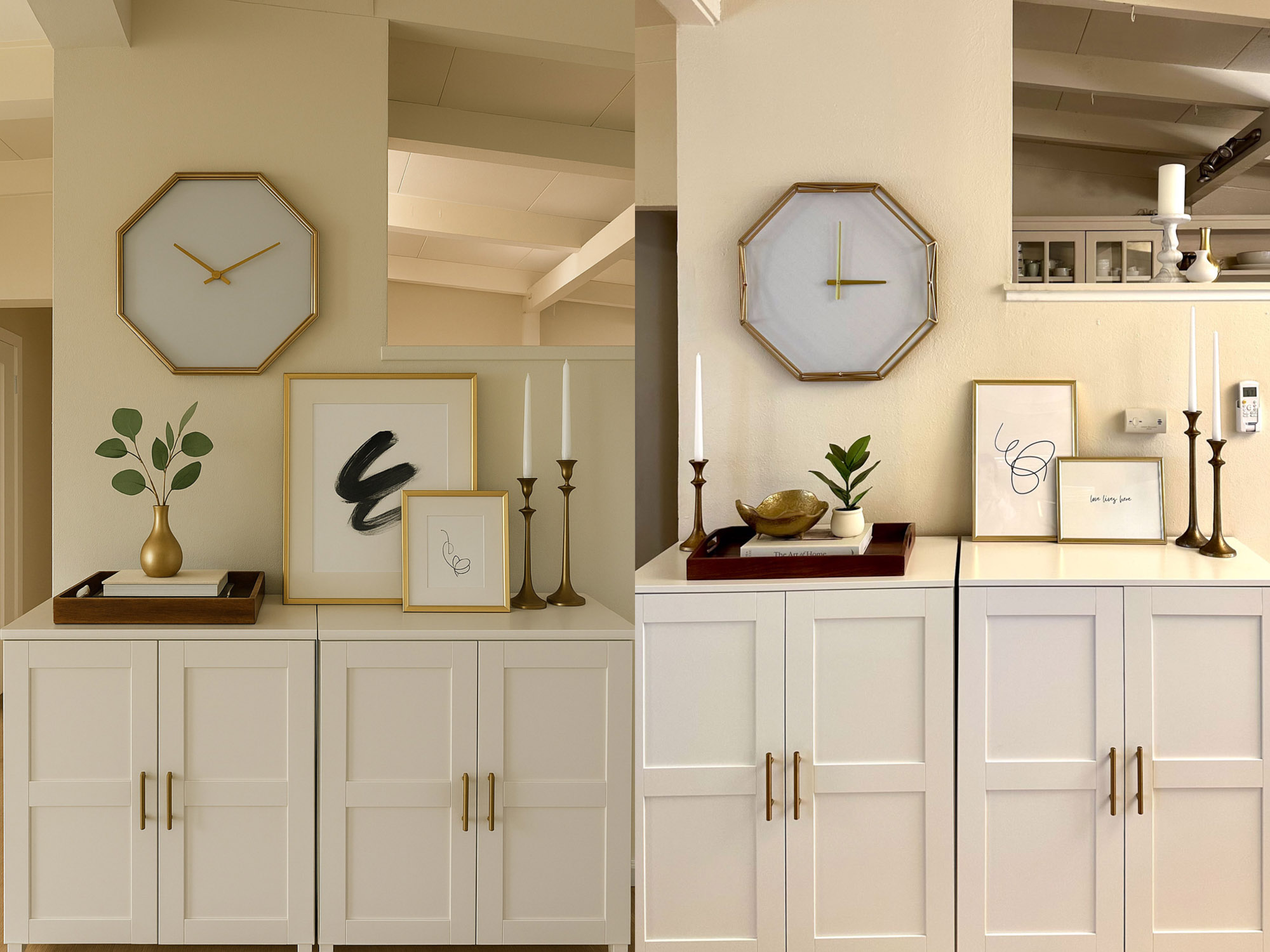
For example, I liked the idea of having artwork and candles on one cabinet and a styled tray on the other, but I didn’t agree with its assessment of which cabinet to place each arrangement on. That’s partly because ChatGPT isn’t great with spatial awareness and scaling, but also comes down to personal preference.
5. This or That: Ask ChatGPT
Most interior design requires many small decisions, which can be exhausting (ask my husband). ChatGPT can help remove some of that decision paralysis! Upload photos of specific decisions you’re trying to make and ask which one looks better.

For example, I had several gold objects as options to add to my tray. Since I was having trouble deciding, I asked ChatGPT to choose for me, and I was happy with its recommendation.


6. Share Your Work with ChatGPT
Once you have an initial product you’re reasonably satisfied with, share it with ChatGPT for feedback! Just be specific about what kind of input you want, or you may get more than you were hoping for.
One note of warning: ChatGPT has a strong tendency to be a bit of a yes-man. You’ve probably noticed its tendency to praise you shamelessly (e.g., “You have such a great eye” or “That’s EXACTLY the question you should be asking”).
Although this can be amusing and seems annoying at worst, it can also give you false information. Recently, ChatGPT hallucinated something it knew I wanted to hear, and when I asked it for a source, it completely backtracked.
To help address this, you can set custom instructions in ChatGPT or simply ask it to remember that you always want it to be honest and data-driven with you. I asked it to remember that, and now it shows up in my saved memories. However, when in doubt, I always add “I need honesty” just in case.
After I finished styling my cabinets, I asked for some more help with styling the shelf above. After a great deal of back and forth and testing out multiple versions, we landed on a look that I loved!


Tips for Getting the Best Interior Design Advice from ChatGPT
Now that we’ve gone over the step-by-step guide, I want to share a few tips that will help you get the best interior design advice from ChatGPT.
Tell It About Your Style
One of the reasons ChatGPT is so popular is that you don’t have to be an experienced prompt engineer to get great results. I’m still figuring out ways to fine-tune the prompts I give the model. Just give it a general idea of your aesthetic, as well as specific details about what you’re looking for.
The more information you provide, the more specific the result will be. That can be good or bad, depending on how specific an answer you want, so play around with it. It learns really quickly, so if it generates something you don’t like, just tell it why, and it will pivot.
Share Pictures of Your Actual Space & Decor Elements
Sharing pictures of your space and the decor elements you want included is a great way to get a realistic mockup. I usually start by sharing one image of the main space I’m looking to decorate. Then I upload the decor items later in the process.
Don’t Leave Your Chat
Don’t leave your chat mid-session until you’re actually done. If you’re not signed in, your conversation may disappear when you close the tab, and you’ll have to start over.
ChatGPT has Memory, which lets it remember both long-term saved memories as well as key details across conversations — but it only works if you’re signed in. You can turn Memory on or off, review or delete what’s saved, and set what you want it to remember.
It’s helpful for preferences and recurring facts, but it isn’t perfect and may occasionally miss or misinterpret details.
If Memory is off, be extra careful about leaving your chat. Even with Memory on, the model won’t always pick up exactly where you left off. If you need continuity, keep the same thread open.
Copy/pasting previous messages into a new chat can work, but it’s tedious. If you aren’t signed in, leaving the chat means your progress is gone for good.
Rename Your Chats & Use Projects to Stay Organized
Along the same lines, if you’re like me and end up with hundreds of chats, it’s easy to confuse them. ChatGPT titles each chat by default, and the names can sound similar (I had five different chats all named “Pergola Makeover Ideas”), which is annoying to navigate.
Rather than scrolling back through each chat, you can easily rename them. I usually do version numbers, but sometimes I add keywords that help me remember the content.

Another valuable feature I recommend using is the Projects feature. You can create different projects for different interior design needs. Then, you can either start chats within those projects or move existing chats there.

ChatGPT: Accounts & Access
If you’re not sure which version of ChatGPT you need for interior design, you have a few options.
Using ChatGPT for Free
You don’t need an account to use ChatGPT, but if you’re planning to use it for interior design, I recommend creating one. While you can generate a limited number of images without signing in, you won’t be able to upload photos of your own space, which makes it much harder to get personalized mockups.
With a free account, you’ll gain access to features like file uploads, search, and image generation, but usage limits apply. During high demand, access to certain tools or more advanced capabilities may be restricted or temporarily reduced.
If you’re hesitant about creating an account due to privacy concerns, OpenAI provides memory and personalization controls that allow you to manage what the system remembers. To further protect your privacy, you can choose to have it remember information about you but opt out of having it train on your data. You can review or delete saved memories and adjust data settings in your account preferences.
That said, always be cautious when sharing personal information online.
For interior design purposes, your greatest limitation with a free account will be the small number of file and image uploads and image generations, which can be frustrating if you feel like you’re making a lot of progress in the middle of a brainstorming session.
Using ChatGPT with a Paid Account
If you plan to use ChatGPT regularly for interior design, upgrading to a paid plan can make the experience significantly smoother.
Paid tiers typically offer:
- Higher limits for image uploads and generations
- More consistent access to advanced features
- Priority access during peak usage times
Plan names, pricing, and features change periodically, so it’s worth checking OpenAI’s website for the most up-to-date details before choosing a tier. Options may include entry-level paid plans as well as higher-tier subscriptions with expanded capabilities.
For interior design specifically, the increased image generation limits and more stable access to advanced tools are usually the most valuable benefits.
Limitations of ChatGPT as a Designer
Although ChatGPT is an extremely useful interior design tool, it does have some limitations.
Hallucinations
Hallucinations are always a risk when working with ChatGPT. One of the more annoying ways that it does this with interior design is by combining parts of your home to create rooms that don’t exist.
When trying to style my cabinets, I shared an inspiration image of my bookcase, and it hallucinated a fictional space.

For that reason, I’m cautious about sharing existing pictures of my home, apart from the space I’m actively trying to style. When I do share additional photos, I make it clear that those pictures are just for aesthetic inspiration.
Fortunately, hallucinating on interior design is one of the lower-risk ways ChatGPT messes up since the worst-case scenario is that it just won’t look as good — there’s no “wrong” choice.
Complex or Specific Image Prompts
While ChatGPT’s image generation has come a long way, the model still struggles with complex or specific image prompts.
For example, I asked it to mock up two versions of our pergola with outdoor string lights, one with the lights going around the perimeter of the pergola and one with them zigzagging back and forth. The model was easily able to generate the first image.

But despite dozens of prompt revisions and a very helpful diagram drawn by yours truly, it could not figure out how to do the zigzag and hallucinated a lot.


As I mentioned earlier, attempting to work with ChatGPT to revise an image often results in the image getting progressively worse. I hope that ChatGPT’s image generation will continue to improve over time. In the meantime, just keep in mind that it may not be able to give you the exact visual mockup that you want.
Spatial Awareness/Scale
ChatGPT doesn’t do well with spatial awareness or scale. When I asked it to help style my cabinets in front of a taller wall and a shorter wall, it didn’t understand the clock placement on the taller wall, and so its recommendations were off.
This is one of the reasons ChatGPT is more useful for brainstorming and inspiration than it is for prescriptive or specific design.
Starting Fresh & Ignoring Past Context
ChatGPT latches on to anything you share with it. This is generally positive, but can also be a weakness. If you give it too much inspiration, particularly photos, it will just regurgitate pieces of those images. That might work for an inspiration image, but if it’s photos of your existing decor, you probably don’t want it copied all over your house.
One of the vulnerabilities attached to ChatGPT’s tendency to remember past context is when you want to start over completely. On one occasion, when I didn’t like the direction ChatGPT was taking, I asked it to start fresh, but it continued to generate ideas influenced by our previous conversation.
I complained to ChatGPT about its behavior (as I frequently do), and it gave me a couple of prompts to help minimize this.
To start totally fresh:
“Start fresh with a blank slate: Treat this as if you know absolutely nothing about my past conversations, preferences, or style. Please remove all contextual bias and give me completely new, uninfluenced ideas.”
The short version:
“Start fresh with a blank slate: forget past context and generate new, uninfluenced ideas.”
Or, to start fresh but still remember my overall aesthetic:
“Start fresh with a blank slate: forget past context. Assume I like minimalist, airy interiors with white, gold, and neutral colors, blending modern and natural/classic elements — but no other assumptions.“
It’s not completely foolproof, but for now, saving a blurb like this in a note on your device and copying/pasting it into your chats is the best way to avoid previous contextual bias.
The Future of AI & Interior Design
Will ChatGPT ever replace interior designers? That’s the question everyone seems to be asking these days about most fields. With technology that is evolving so rapidly, it’s hard to predict what will happen. However, I do think that AI has a great deal of potential to continue to impact interior design in the future.
AI & VR
Paired with VR, AI has the power to create an immersive design experience that will help you visualize changes before you make them, saving time and money. VR platforms such as Meta’s VR Layout app let users design their home, including taking measurements and finding furniture that fits.
Since AI still struggles with spatial awareness, combining advanced AI models with VR platforms can produce powerful results. Spacely AI is one example of how AI can be combined with 3D rendering to help with staging and visualization, and offers a glimpse at what the future could look like as these integrations evolve.
While robust platforms like these are particularly useful for super users such as interior designers and architects, potential future integrations with ChatGPT and VR could open up a whole new realm of possibilities for the everyday user.
Smart Home Integration
Although incorporating AI in your home (Alexa is already a lot for me) might feel a little invasive, there’s a huge amount of potential in using AI to customize your space, from smart home assistance to emergency response.
Merging smart home integration with AI could allow for a new level of personalization in your home, although that could come with increased security and privacy risks.
Support for Interior Designers & DIYers Alike
Many of those using ChatGPT for interior design have already been trying to decorate their own homes — they can now just do it better and more efficiently.
On the other hand, there will still be those who continue to hire designers: people who are looking for a human touch, the style of a particular designer, or a full-service solution. Interior designers who can adapt to AI and use it as a tool will succeed, provided they maintain their personal brand and stay ahead of emerging trends.
After all, ChatGPT can tell you how to decorate, but it can’t actually move the couch for you — at least not yet.
More Ways to Transform Your Space
If you’re experimenting with AI to style your home, you might also like my fall coffee table guide — complete with tested prompts and real-life mockups.
And if you’re looking beyond AI, here are more practical ways to elevate your space, from renter-friendly upgrades to lighting tweaks that completely change the mood of a room.

12 Ambient Lighting Ideas to Warm Up Your Space
Make your home cozy with these simple, design-worthy ambient lighting ideas that work in any space.
9 Creative Hacks to Make a Rental Feel Like Home
Check out these easy, renter-friendly hacks to make your home feel more like you.

Common Peel & Stick Wallpaper Mistakes
Learn from our mistakes and discover our tips for installing peel-and-stick wallpaper.
